SRP着色器和Batcher
UlitShader,
使用HLSLPROGRAM 和ENDHLSL 包裹
包含文件可以像c/c++ 一样使用。 防止重复编译使用 #if
条件编译。 #include 包含路径相对于文件夹路径。
Unlit.shader
Shader "Custom RP/Unlit"
{
    Properties
    {
        _BaseColor("BaseColor", Color) = (1, 1, 1, 1)
    }

    SubShader
    {
        Tags { "RenderType" = "Opaque" }

        Pass
        {
            HLSLPROGRAM
            #pragma vertex UnlitPassVertex
            #pragma fragment UnlitPassFragment
            #include "UnlitPass.hlsl"
            ENDHLSL
        }
    }
}
UnlitPass.hlsl
#ifndef CUSTOM_UNLIT_PASS_INCLUDED
#define CUSTOM_UNLIT_PASS_INCLUDED

#include "../ShaderLibrary/Common.hlsl"


float4 _BaseColor;

float4 unity_LODFade;
real4 unity_WorldTransformParams;
CBUFFER_END


float4 UnlitPassVertex(float3 positionOS : POSITION) : SV_POSITION{
    float3 positionWS = TransformObjectToWorld(positionOS);

    return TransformWorldToHClip(positionWS);
}

float4 UnlitPassFragment() : SV_TARGET{
    return _BaseColor;
}

#endif
#ifndef CUSTOM_COMMON_INCLUDED
#define CUSTOM_COMMON_INCLUDED
#include "Packages/com.unity.render-pipelines.core/ShaderLibrary/Common.hlsl"
#include "UnityInput.hlsl"
#define UNITY_MATRIX_M unity_ObjectToWorld
#define UNITY_MATRIX_I_M unity_WorldToObject
#define UNITY_MATRIX_V unity_MatrixV
#define UNITY_MATRIX_VP unity_MatrixVP
#define UNITY_MATRIX_P glstate_matrix_projection
float3 TransformObjectToWorld(float3 positionOS) {
return mul(unity_ObjectToWorld, float4(positionOS, 1.0)).xyz;
}
float4 TransformWorldToHClip(float3 positionWS) {
return mul(unity_MatrixVP, float4(positionWS, 1.0));
}
#endifUnityInput.hlsl
#ifndef CUSTOM_UNITY_INPUT_INCLUDED
#define CUSTOM_UNITY_INPUT_INCLUDED


float4x4 unity_ObjectToWorld;
float4x4 unity_WorldToObject;
real4 unity_WorldTransformParams;

float4x4 unity_MatrixVP;
float4x4 unity_MatrixV;
float4x4 glstate_matrix_projection;
#endif
现在使用 这个着色器 渲染多个对象 出现drawcall过多问题
每次绘制调用都需要CPU和GPU之间的通信。如果需要发送大量数据到GPU,那么它可能会浪费时间。当CPU忙于发送数据时,它不能做其他事情。这两个问题都可以降低帧速率。目前我们的方法很简单:每个对象都有自己的draw调用。这是最糟糕的方法,尽管我们最终只发送了很少的数据,所以现在还好。
SRP Batcher
批处理是结合draw调用的过程,减少了花费在CPU和GPU之间的通信时间。最简单的方法是启用SRP批处理程序。然而,这只适用于兼容的着色器,而我们的Unlit着色器不是。您可以在检查器中选择它来验证这一点。有一个表示不兼容的SRP批处理程序行,其中给出了一个原因。
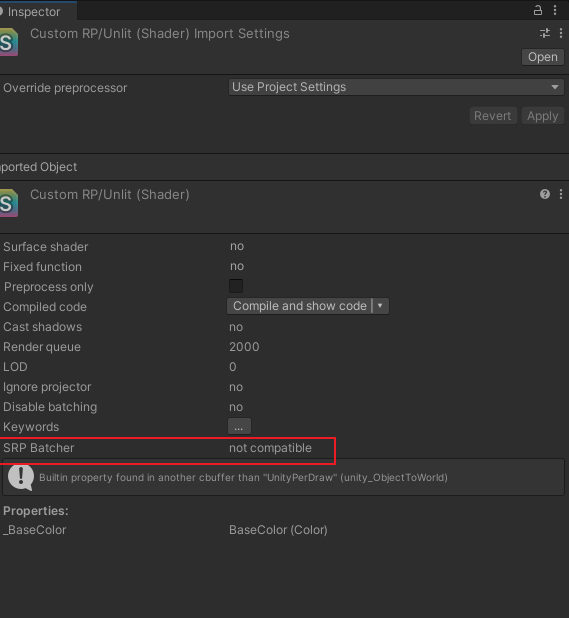
SPR batch 采用的方法不是减少 draw calls 的数量,而是采用了更精简的办法。它把材质的属性先缓存到GPU中,因此这样每个Drawcall就不用发送同样的数据了。这大大减少了GPU 与 CPU 的 交流中使用的数据。但是 使用这种方式的话会有严格的要求条件:数据是Uniform 类型的结构体。
CBUFFER_START(UnityPerMaterial)
float4 _BaseColor;
CBUFFER_END
CBUFFER_START(UnityPerDraw)
    float4x4 unity_ObjectToWorld;
    float4x4 unity_WorldToObject;
    float4 unity_LODFade;
    real4 unity_WorldTransformParams;
CBUFFER_END
如果使用 MaterialPropertyBlock 进行赋值, drawcall
又回到 未合批状态。
GPU Instanced
添加#pragma multi_compile_instancing指令
因为GPUInstanced
需要通过数组提供数据,我们的着色器目前不支持它。第一步是添加#pragma multi_compile_instancing指令到我们的着色器的通道块的顶点和片段编译的上方。
#pragma multi_compile_instancing

添加 gpuinstance 内置
#include "Packages/com.unity.render-pipelines.core/ShaderLibrary/UnityInstancing.hlsl"
instance 属性
被 UNITY_INSTANCING_BUFFER_START(xxx) 和
UNITY_INSTANCING_BUFFER_END(xxx) 包裹, 使用
UNITY_DEFINE_INSTANCED_PROP(type, name) 声明。
 //float4 _BaseColor; 改为

 UNITY_INSTANCING_BUFFER_START(UnityPerMaterial)
 UNITY_DEFINE_INSTANCED_PROP(float4, _BaseColor)
 UNITY_INSTANCING_BUFFER_END(UnityPerMaterial)
instance id
顶点输入结构和输出结构分别添加
UNITY_VERTEX_INPUT_INSTANCE_ID 属性。
着色器函数 获取instanceid
UNITY_SETUP_INSTANCE_ID(input);。
通过 UNITY_ACCESS_INSTANCED_PROP(结构名, 字段名)
获取属性。
struct a2v {
    float3 position : POSITION;
    UNITY_VERTEX_INPUT_INSTANCE_ID
};

struct v2f {
    float3 position : SV_POSITION;
    UNITY_VERTEX_INPUT_INSTANCE_ID
};

v2f vert(a2v input)
{
    v2f output;
    UNITY_SETUP_INSTANCE_ID(input);
    UNITY_TRANSFER_INSTANCE_ID(input, output);

    float3 worldPos = TransformObjectToWorld(input.position);
    output.position = TransformWorldToHClip(worldPos);
    return output;

}

float4 frag(v2f input): SV_Target
{
    UNITY_SETUP_INSTANCE_ID(input);
    float4 baseColor = UNITY_ACCESS_INSTANCED_PROP(UnityPerMaterial, _BaseColor);
    return baseColor;
}
GPU Instanced 需要多少个draw调用取决于平台,因为每个draw调用的最大缓冲区大小是不同的。
动态合批(Dynamic Batching)
还有第三种减少draw调用的方法,称为动态批处理。这是一个古老的技术,将多个共享相同材质的小网格合并成一个更大的网格。当使用每个对象的材质属性时(MaterialBlock),这也不起作用。 根据需要生成较大的网格,所以它只适用于小网格。球体太大了,但是立方体就可以了。 实例化设置为false, 动态合批设置为true。
var drawingSettings = new DrawingSettings(unlitShaderTagId, sortingSettings)
{
    enableDynamicBatching = useDynamicBatching,
    enableInstancing = useGPUInstancing
};
其他一些,
贴图、采样器 不能作为实例化属性。
Shader支持的Aribute:
- [Enum(UnityEngine.Rendering.BlendMode)] , 作为enum 在材质面板绘制, 对应CSharp 枚举。
- [Enum(Off, 0, On, 1)] , key -v 形式的enum。
- [Toggle(_CLIPPING)]